 BlueprintReview
Install
BlueprintReview runs on Windows 10 and 11 (64-bit). The command-line tool, blueprintreview, also runs on Linux
and macOS.
Before you start
- Download the newest version from the BlueprintReview site. It
links to two files: the installer (
.msi) and a zip. - You don't need Unreal Engine installed, or administrator rights for a normal install.
Install with the installer
- Run
blueprintreview-app-x86_64-pc-windows-msvc.msi. - The installer isn't code-signed yet, so Windows SmartScreen may stop it: click More info, then Run anyway.
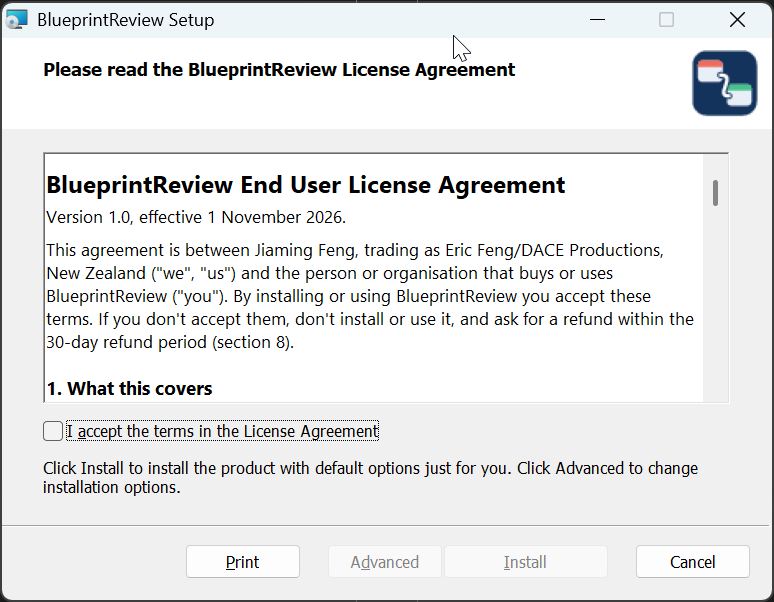
- Read the license agreement, tick the box to accept it, and click Install. This installs for you alone into
%LOCALAPPDATA%\Programs\BlueprintReview, without administrator rights.- Click Advanced instead to install for every user of the PC (Windows asks for administrator rights), to
pick another folder, or to choose the parts: the app (with or without the Open with entry for
.uassetfiles) and the command-line tool (with or without adding it toPATH).
- Click Advanced instead to install for every user of the PC (Windows asks for administrator rights), to
pick another folder, or to choose the parts: the app (with or without the Open with entry for
- On the last page, leave Launch BlueprintReview ticked and click Finish.
The installer adds a Start menu entry, puts blueprintreview on your PATH, and adds BlueprintReview to
Explorer's Open with list for .uasset files. It doesn't make itself the default program for them.
For every user, from a script
From an administrator prompt:
msiexec /i blueprintreview-app-x86_64-pc-windows-msvc.msi ALLUSERS=1 /qn
This installs into C:\Program Files\BlueprintReview, uses the system PATH, and shows no window. Install updates
the same way. A PC has either a per-user or an all-users install, not both: uninstall one before switching.
Or unpack the zip
Unpack blueprintreview-app-x86_64-pc-windows-msvc.zip into a folder of its own and run blueprintreview-app.exe.
Keep blueprintreview-app.exe and blueprintreview.exe together: the git setup looks for the app next to the
command-line tool. Add the folder to your PATH to use blueprintreview from any terminal.
Check it works
-
Start BlueprintReview from the Start menu. An empty window opens, with Open… and Open Folder… at the top left.
-
In a new terminal, run:
blueprintreview --versionIt prints the version. If the command isn't found, open a new terminal (the installer changed
PATH), or check that the folder is on yourPATH.
Updates
Once a day, at start-up, BlueprintReview checks the site for a newer version. When there is one, a Version X available button appears at the top right; it opens the download page. Nothing installs by itself. Run the new installer over the old version: your settings and license stay.
To turn the check off, click the version number at the top right and untick Check for updates daily.
Uninstall
Settings → Apps → Installed apps → BlueprintReview → Uninstall. For the zip, delete its folder. Your settings and
logs are in %LOCALAPPDATA%\BlueprintReview; delete that folder too to remove everything.
Next
Get the sample project to follow the other guides, or go straight to Open and browse a Blueprint.